SoundBubble: Finger-Bound Virtual Microphone using Headset/Glasses Beamforming
CHI 2026
Carnegie Mellon University
Abstract
Hands are the chief appendage with which we manipulate the world around us, creating sounds as they go. As such, they are a rich source of information that computers can leverage for input and context sensing. Indeed, many prior works in HCI have explored this idea by instrumenting users' hands with a microphone, often integrated into a ring, wristband, or watch. In this work, we explore an alternative bare-hands approach --- by using a microphone array integrated into a user's headset/glasses, we can use beamforming to create a virtual microphone that tracks with the user's fingers in 3D space. We show this method can capture even the subtle noise of a finger translating across surfaces, including skin-to-skin contact for micro-gestures, as well as passive widget interactions.
SoundBubble enables diverse interactions via beamformed audio
Ad Hoc Touch
Hand Micro-Gestures
Passive Widget Interactions
Held Object Activity Recognition
SoundBubble is a virtual microphone, capturing sound inside the bubble
* Turn on audio to hear the SoundBubble effect.
SoundBubble acts as a virtual microphone anchored to the attached object (here, fingertip). In this video, music plays from the white speaker and people chat behind; when the SoundBubble enabled, it isolates the finger’s button clicks and suppress the background noise.
SoundBubble acts as a virtual microphone anchored to the attached object (here, fingertip). In this video, music plays from the white speaker and people chat behind; when the SoundBubble enabled, it isolates the finger’s button clicks and suppress the background noise.
AR/VR Headset with an Array Microphone
SoundBubble uses hand tracking to localize the target (e.g., a fingertip) and amplifies its sound via acoustic beamforming using a microphone array.
Acoustic Beamforming and Signal Processing
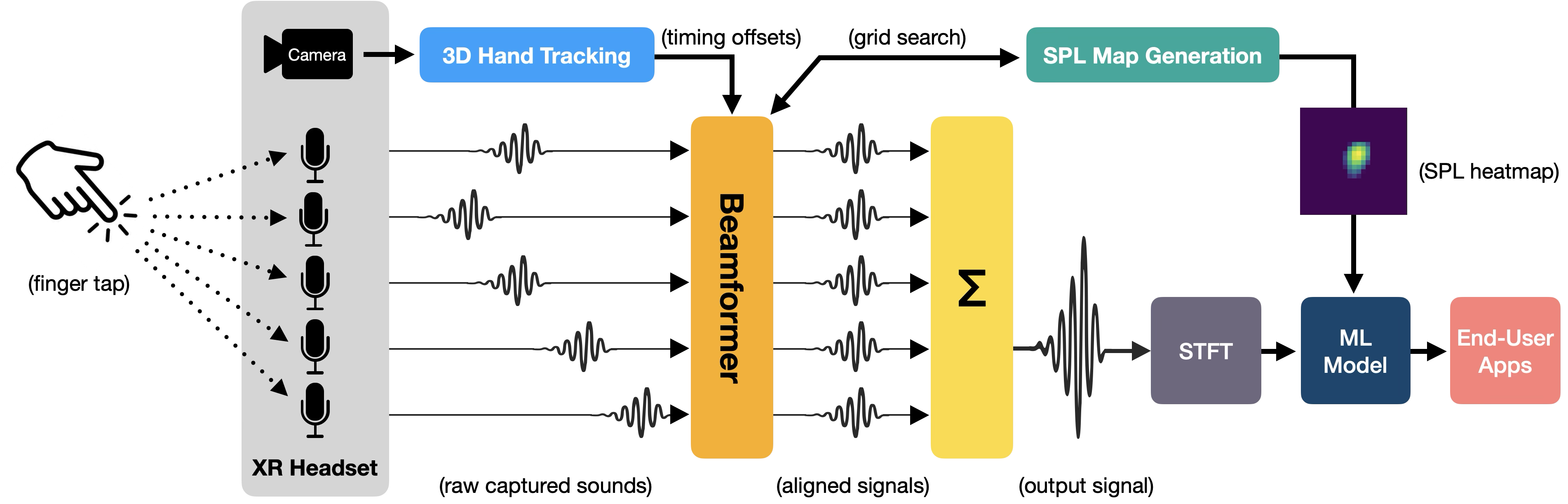
As shown in the microphone array above, the microphones are spatially separated, so target sound arrives with different time delays to each microphone. Using 3D hand tracking, SoundBubble time-aligns the signals, and sums them into a higher-SNR audio stream. The beamforming process also produces a sound pressure level (SPL) map around the finger. The beamformed audio and SPL map are then fed into an ML model to detect tap events.
* Turn on audio to hear the SoundBubble effect.
As the finger approaches to the iPhone speaker, the sound is amplified.
As the finger approaches to the iPhone speaker, the sound is amplified.
Each colored line shows a ray from a microphone to the right fingertip. SoundBubble amplifies taps from the right finger while attenuating taps from the left finger.
Sound Pressure Level Map
We grid-search a 10 cm × 10 cm region around the fingertip and see that the peak sound pressure level originates from the target finger. Check out diverse interaction sounds captured during hand manipulation:
Such as wiping,
writing,
contact on everyday surface,
and contact on the skin that is useful for physically anchored AR input.
Microphone Geometry Ablation Study
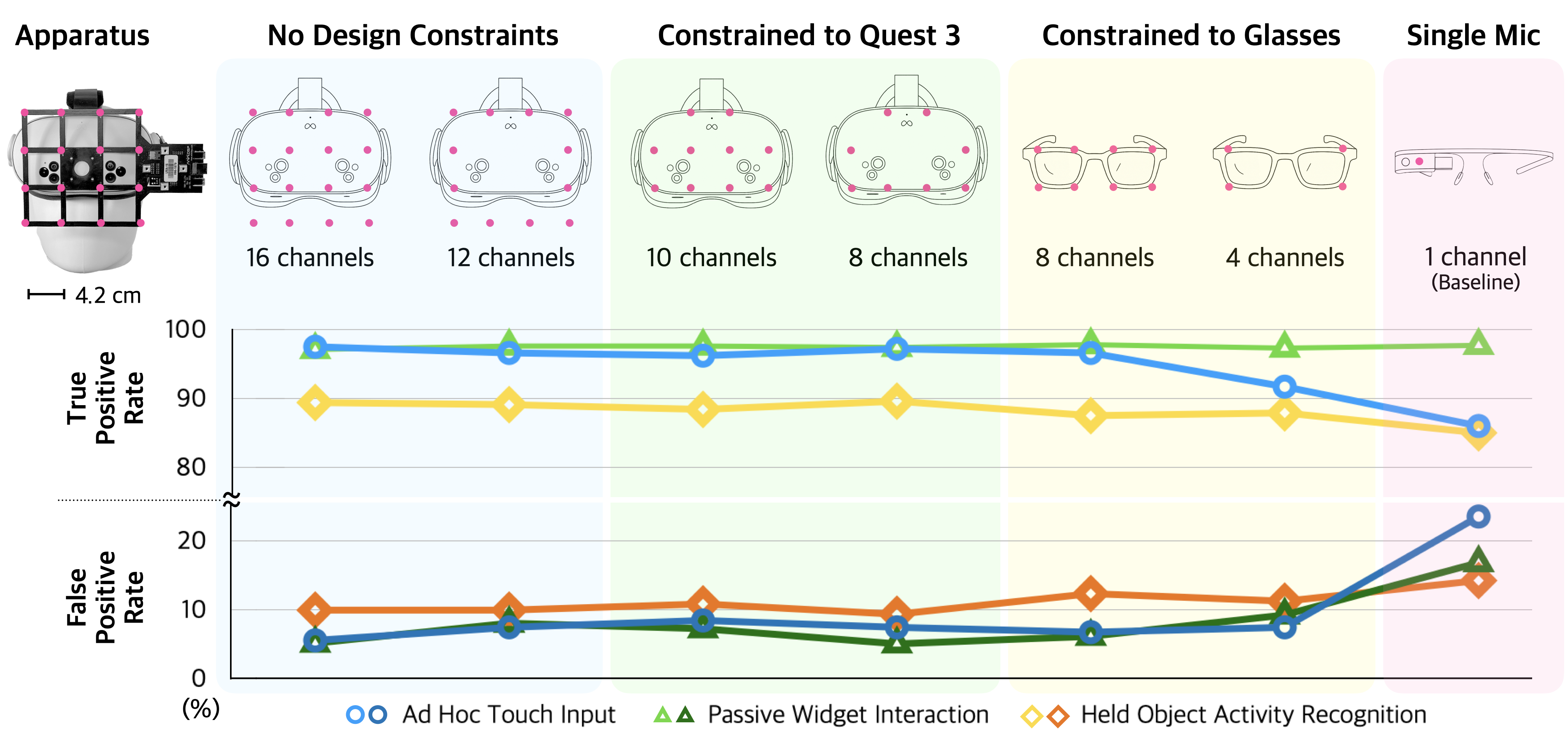
Results remain largely stable down to the two 8-channel devices, but errors begin to increase. A substantial drop appears with the 4-channel glasses, suggesting beamforming quality is significantly impacted and this cascades into poorer detection. A single omnidirectional microphone provides a useful baseline: it shows clear degradation for ad hoc touch input and held-object activity, highlighting the advantage of SoundBubble’s multi-mic beamforming.
Citation
@inproceedings{daehwa2026soundbubble,
author = {Kim, Daehwa and Harrison, Chris},
title = {SoundBubble: Finger-Bound Virtual Microphone using Headset/Glasses Beamforming},
year = {2026},
isbn = {9798400722783},
publisher = {Association for Computing Machinery},
address = {New York, NY, USA},
url = {https://doi.org/10.1145/3772318.3791589},
doi = {10.1145/3772318.3791589},
booktitle = {Proceedings of the 2026 CHI Conference on Human Factors in Computing Systems},
articleno = {1666},
numpages = {16},
series = {CHI '26}
}
Designed by Daehwa